Kinematic Planner
The planning package (strands_robots.planning) is the intent layer at the
top of the locomotion control stack. Instead of commanding joint targets, you
steer a robot by velocity, height and movement style - from a keyboard,
gamepad, LLM agent, or a scripted timeline - and the planner converts that
intent into the locomotion goal the policy already consumes.
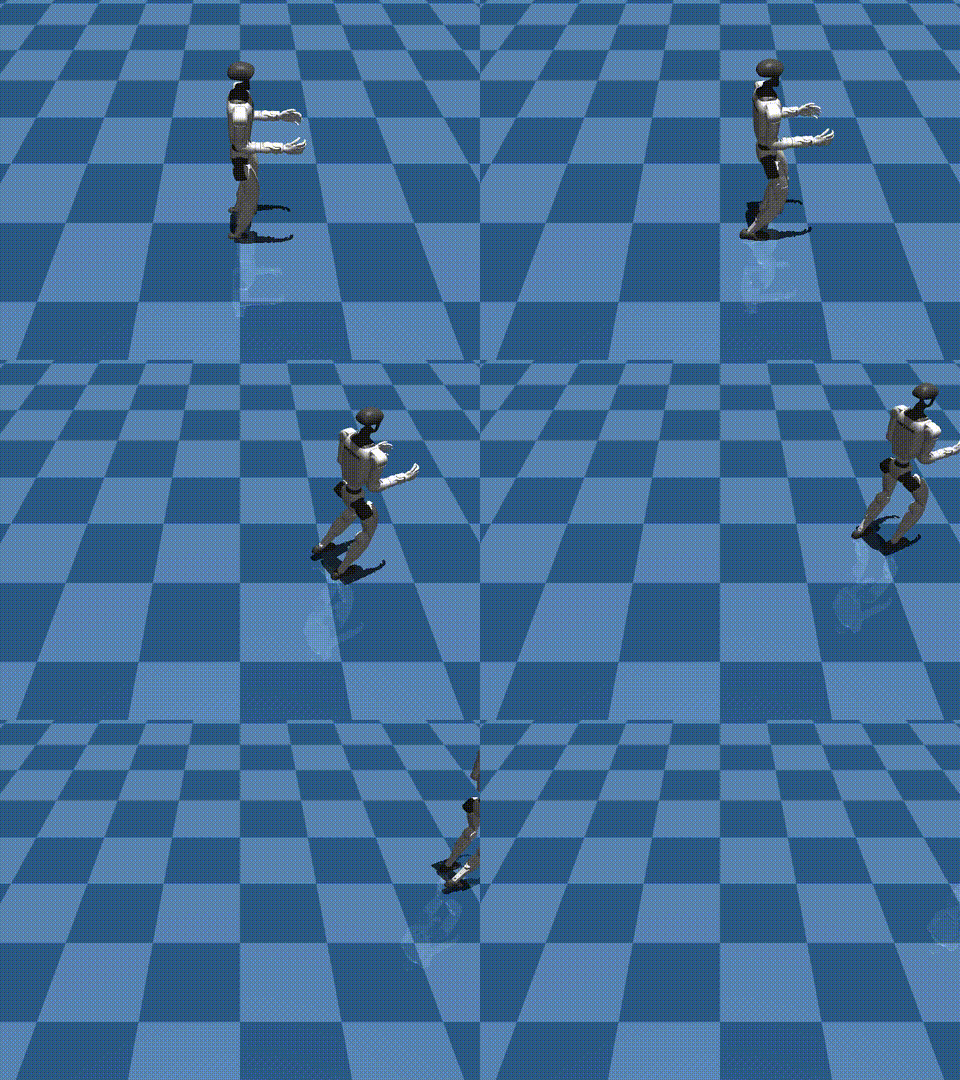
A Unitree G1 driven by a KinematicPlanner: a scripted velocity/yaw sequence
(forward -> curving left -> faster forward) feeds the WBC locomotion policy. The
robot covers ~1.5 m forward and ~1.2 m laterally while staying upright. Rendered
headless in MuJoCo.
Where it sits
 keyboard / gamepad / agent / scripted   (intent)
                |
                v
         KinematicPlanner    --> PlannerCommand{root_vel, height, style}
                |  to_policy_kwargs()
                v
   locomotion Policy (WBC, ...)   reads target_velocity / target_height / locomotion_style
                |
                v
             robot joints
A planner does not introduce a second goal API on the policy. It maps each
command onto the existing locomotion goal-kwarg contract (the
target_velocity policy_kwargs that WBC and other non-VLA providers already
read), so it composes with run_policy unchanged.
Quick start
from strands_robots import Robot
from strands_robots.planning import KinematicPlanner
from strands_robots.planning.inputs import KeyboardInput

robot = Robot("unitree_g1")
robot.run_policy(
    policy_provider="wbc",
    policy_config={"checkpoint": "/path/to/grootwbc-g1", "walk": True},
    planner=KinematicPlanner(KeyboardInput()),  # NEW kwarg
    duration=60.0,
    control_frequency=50.0,
)
Each control tick the runner samples planner.poll().to_policy_kwargs() and
merges it over the static policy_kwargs (planner wins), so the locomotion goal
varies over time under live control.
PlannerCommand
A single immutable, JSON-serialisable intent:
| field | meaning |
|---|---|
root_vel |
base velocity (vx, vy, omega) - m/s, m/s, rad/s |
height |
target base height (m) |
style |
movement style (see below) |
to_dict() / from_dict() make it mesh-transport friendly - a remote peer can
stream commands to a locomotion node unchanged.
Movement styles
Style names match the GR00T Whole-Body-Control SONIC demos exactly:
run, happy, stealth, injured, kneeling, hand_crawling,
elbow_crawling, boxing. A policy that does not understand a style ignores
the locomotion_style kwarg, so emitting a style is always safe; a
style-conditioned policy uses it to switch gaits.
The MotionBricks provider (policy_provider="motionbricks")
is style-conditioned: it translates the planner's locomotion_style to the
matching G1 clip (stealth -> stealth_walk, boxing -> walk_boxing, ...),
so a planner switches the synthesised gait live. See the MotionBricks page for
the full style-to-clip table.
Input sources
Every source is a non-blocking InputSource the planner polls on a background
thread, so reading intent never stalls the control loop.
KeyboardInput- WASD move, QE turn, RF height, space halt,1-8style, ESC stop. Degrades to a no-op when stdin is not a TTY.GamepadInput- analog sticks + buttons. Needs the optionalpygamedependency (pip install "strands-robots[planning]").AgentInput- hand it astrands.Agentand a goal string; the agent gets aset_locomotion_intenttool and decomposes natural language into a stream of commands.ScriptedInput- a deterministic timed schedule of updates. Headless and reproducible; ideal for demos and tests.
Clamping and debounce
KinematicPlanner clamps velocity to +/- max_speed (yaw to +/- max_omega)
and height into height_range, and debounces style switches by
style_debounce_s so a key/button bounce does not thrash the gait. An ESC /
stop=True zeroes velocity and sets planner.stop_requested, which a caller
driving a long rollout may poll to break early.
Examples
examples/planner/scripted_g1.py- the headless demo above.examples/planner/keyboard_g1.py- drive a G1 live from the terminal.examples/planner/agent_g1.py "walk then crawl then stand"- natural-language steering.