Isaac Sim Backend
GPU-native photorealistic simulation backend for strands-robots-sim using
NVIDIA Isaac Sim. This page is the backend reference — class layout,
current status, configuration matrix, procedural builders, loaders, and
tests.
For introductory material, prefer:
- Getting Started → Installation —
Isaac Sim install +
pip install 'strands-robots-sim[isaac]'. - Getting Started → Quickstart — first RTX render in a fresh world.
- Architecture — the entry-point plugin contract.
- Simulation → World Building — the
add_robot/add_object/add_camerareference.
Overview
IsaacSimulation provides:
- Photorealistic rendering via Omniverse RTX (path-traced, ground-truth depth, semantic segmentation)
- Asset pipeline: USD-native scenes, NVIDIA Nucleus assets
- Sensors: RTX cameras, LiDAR, depth, contact, IMU (GPU-batched)
- Synthetic data generation: Replicator pipeline for domain randomization
- Fleet replication: parallel environments via
omni.isaac.cloner.Cloner - Isaac Lab integration: GPU-accelerated RL environments
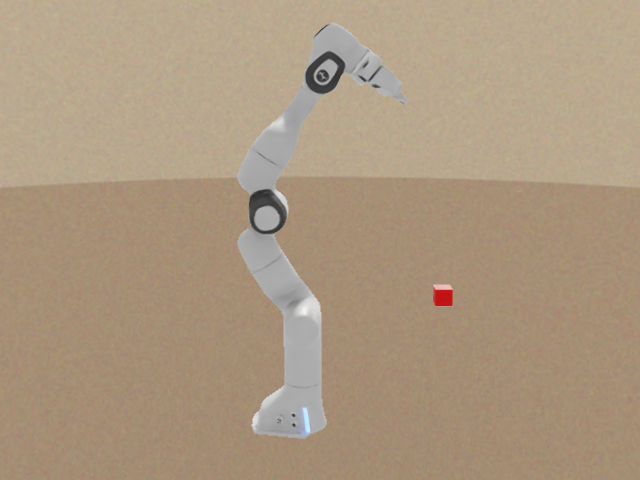
RTX-rendered Franka Panda composited over a procedural background — output of
examples/isaac_gs/render_demo.py,
which drives IsaacSimulation.render() in render_mode="rtx_realtime".
The same RTX pipeline driven across frames: render_demo.py --wave steps the
Franka through a waving motion and captures each frame with
IsaacSimulation.render(), demonstrating per-frame RTX capture (24 frames).
On the omni.isaac.* vs isaacsim.* namespaces
This backend targets Isaac Sim 6.0 (Python 3.12) and uses the
modern isaacsim.* namespace on the runtime path. Every Isaac import
tries the isaacsim.* location first and falls back to the legacy
omni.isaac.* path via try: ... except ImportError: so Isaac Sim
4.x installs aren't hard-broken during the transition. The mapping:
isaacsim.core.api.World, isaacsim.core.api.objects,
isaacsim.sensors.camera.Camera,
isaacsim.core.api.articulations.Articulation (with
isaacsim.core.prims.SingleArticulation as a secondary location),
isaacsim.core.utils.{prims,stage,viewports}, the SimulationApp
entry point (isaacsim.SimulationApp, with omni.isaac.kit as a
fallback), and the URDF importer (isaacsim.asset.importer.urdf).
import omni.usd stays under omni.* (not renamed on 6.0). See
PR #74 for the
original validation and the in-code policy note in simulation.py.
Status. The core simulation data-plane is wired and was validated end-to-end on the pinned
nvcr.io/nvidia/isaac-sim:6.0image (full lifecycle:is_available→create_world→add_robot(usd_path=...)→add_camera→step). Working today:IsaacConfig,IsaacSimulation.is_available(), world / lifecycle (create_world/destroy/cleanup); procedural builders viaadd_robot("so100" | "panda" | "unitree_g1"); scene primitives viaadd_object/remove_object(shape primitives throughisaacsim.core.api.objects.{Dynamic,Fixed}{Cuboid,Sphere,Cylinder,Capsule}); cameras viaadd_camera/remove_camera(isaacsim.sensors.camera.Camera— prim + look-at + FOV wired);render's RTX frame-extraction path against anadd_camerahandle (realget_rgba/get_depthcalls; returns blank frames inheadlessmode, when no camera is configured, or against a camera with no RTX handle attached); USD-loaded robots viaadd_robot(name, usd_path=...)and URDF-loaded robots viaadd_robot(name, urdf_path=...)(both construct the underlyingisaacsim.core.api.articulations.Articulation— joints +send_action/get_observationwork end-to-end; URDF→USD conversion runs through the directisaacsim.asset.importer.urdfinterface); and theisaac.loaders.load_urdf/load_mjcf/load_usdfunctions for ingesting external robot description files into aProceduralRobotdataclass. Genuinely still no-op:replicate(fleet replication), and the articulation-touching paths underget_observation/send_actionfor procedural robots specifically — the procedural branch ofadd_robotauthors USD prims via the build-via-API flow but does not construct anArticulationhandle, so a procedural robot'sget_observation()returns{}and no joint state is read; no exception is raised. USD- and URDF-loaded robots run end-to-end — use those (or load a real Franka USD) for any manipulation eval. For the running benchmark caveat (evaluate_benchmarkunder Isaac Sim's bundled Python) see Examples → Overview and the umbrella tracker #8.
Installation
Isaac Sim is not installable from PyPI. It is an NVIDIA Omniverse Kit application that must be installed separately.
Option 1: NVIDIA Omniverse Launcher (recommended)
- Download NVIDIA Omniverse Launcher
- Install Isaac Sim 6.0 (or newer) from the Exchange tab
- Install Python dependencies:
Option 2: Isaac Lab
git clone https://github.com/isaac-sim/IsaacLab.git
cd IsaacLab
./isaaclab.sh -i
pip install 'strands-robots-sim[isaac]'
Option 3: Docker
docker pull nvcr.io/nvidia/isaac-sim:6.0
docker run --gpus all -it nvcr.io/nvidia/isaac-sim:6.0
# Inside container:
pip install 'strands-robots-sim[isaac]'
Requirements
- NVIDIA GPU (RTX 2070+ or A100/H100 for fleet training)
- CUDA 12.0+
- Isaac Sim 6.0 or newer (the repo pins/tests
nvcr.io/nvidia/isaac-sim:6.0) - Linux (Ubuntu 22.04+ recommended)
- Python 3.12
Quick Start
from strands_robots_sim.isaac import IsaacSimulation, IsaacConfig

# Check availability
available, reason = IsaacSimulation.is_available()
if not available:
    print(f"Isaac Sim not available: {reason}")
    exit(1)

# Create simulation
config = IsaacConfig(
    num_envs=1,
    headless=True,
    render_mode="rtx_realtime",
)
sim = IsaacSimulation(config)

# Create world and add robot
sim.create_world()
sim.add_robot("so100")
sim.add_camera("front_cam", position=[1.0, 0.0, 0.5])

# Step and render
sim.step(100)
result = sim.render("front_cam")
rgb = result["rgb"]  # (H, W, 3) uint8

# Clean up
sim.destroy()
Fleet Training (Multi-Env)
config = IsaacConfig(num_envs=1024, headless=True)
sim = IsaacSimulation(config)
sim.create_world()
sim.add_robot("so100")
sim.replicate(1024)  # 1024 parallel environments

for step in range(10000):
    sim.step(1)
    obs = sim.get_observation("so100")  # batched across all envs
    # ... RL training loop ...

sim.destroy()
Entry-Point Discovery
Isaac Sim registers as a strands_robots.backends entry point:
from importlib.metadata import entry_points

for ep in entry_points(group='strands_robots.backends'):
    print(ep.name, '->', ep.value)
# isaac -> strands_robots_sim.isaac.simulation:IsaacSimulation
Configuration
IsaacConfig Parameters
| Parameter | Default | Description |
|---|---|---|
num_envs |
1 | Number of parallel environments |
device |
"cuda:0" | CUDA device |
headless |
True | Run without GUI |
physics_dt |
1/120 s | Physics timestep |
rendering_dt |
1/30 s | Rendering timestep |
render_mode |
"headless" | "headless", "rtx_realtime", or "rtx_pathtracing" |
gravity |
(0, 0, -9.81) | Gravity vector (Z-up) |
camera_width |
640 | Default camera width |
camera_height |
480 | Default camera height |
enable_rtx_sensors |
True | Enable RTX-accelerated sensors |
Environment Variables
| Variable | Default | Description |
|---|---|---|
STRANDS_ISAAC_HEADLESS |
- | Override headless mode ("true"/"false") |
STRANDS_ISAAC_RTX_PATHTRACING |
- | Enable RTX pathtracing ("true"/"false") |
STRANDS_ISAAC_NUCLEUS_URL |
- | Override Omniverse Nucleus server URL |
Procedural Robots
The following robots can be added without any asset files:
so100(aliases:so-100,so_100,so101) -- 6-DOF tabletop armpanda(aliases:franka,franka_panda) -- 7-DOF manipulatorunitree_g1(aliases:g1) -- 21-DOF humanoid (simplified). The six 2-DOF compound joints (hips / ankles / shoulder-yaw + elbow on each arm) are split through massless intermediate*_linkbodies so the kinematic graph is a valid tree by construction.
sim.add_robot("so100")  # procedural, no asset files needed
sim.add_robot("panda")
sim.add_robot("g1", data_config="unitree_g1")
Every procedural builder validates the kinematic graph at construction time via _validate_kinematic_tree: a robot whose joint set has a duplicate (parent_body, child_body) edge fails fast with ValueError listing the offending bodies + joint names. Validation is fail-first by default with no env-var escape hatch — shipping a knowingly-broken robot has no good use case in this package.
Loading External Description Files (URDF / MJCF / USD)
The strands_robots_sim.isaac.loaders module produces ProceduralRobot dataclass instances from existing robot description files, so callers don't have to add a new _build_* function for every robot they need. Three formats are supported:
from strands_robots_sim.isaac.loaders import load_urdf, load_mjcf, load_usd

# URDF -- stdlib XML; no third-party deps required.
panda_urdf = load_urdf("/path/to/panda.urdf")

# MJCF (MuJoCo XML) -- stdlib XML; LIBERO scenes, robosuite assets.
panda_mjcf = load_mjcf("/opt/conda/.../robosuite/models/assets/robots/panda/robot.xml")

# USD -- requires `pxr` (ships in the [isaac] extra).
panda_usd = load_usd("/path/to/panda.usda")

# All three return the same dataclass shape.
print(panda_urdf.num_joints, panda_urdf.joint_names)
The loaders share failure semantics: missing path raises FileNotFoundError, malformed document raises ValueError with the offending element + path, and an empty document (zero links / joints / bodies) also raises ValueError. Loaders never silently return a phantom robot.
The hardcoded _build_* functions in procedural.py remain as a zero-dep, testable fallback used when no description file is configured. Loaders layer on top.
The loader module is verified against the seven robosuite-bundled MJCFs that the strands-robots LIBERO adapter consumes (panda / iiwa / kinova3 / jaco / sawyer / ur5e / baxter); the parity tests live in strands_robots_sim/isaac/tests/test_loaders.py::TestRobosuiteMjcfParity.
Comparison with the upstream MuJoCo backend
| Feature | MuJoCo (strands-robots) |
Isaac Sim (this repo) |
|---|---|---|
| Physics parallelism | 1-8 envs | 1024+ envs |
| Apple Silicon | Yes | No (CUDA only) |
| Rendering | Software / GL | RTX photorealistic |
| USD native | No | Full |
| Sensors (camera, LiDAR) | Basic | RTX GPU-batched |
| Synthetic data gen | No | Replicator |
| Install size | ~50 MB | ~30 GB |
| Setup friction | Low | High |
| Use case | Fast iteration / CI / macOS | Photoreal sim2real / fleet RL |
For the cross-backend story (when to pick which) see Simulation → Overview.
Architecture
strands_robots_sim/isaac/
    __init__.py         PEP 562 lazy exports (zero omni overhead on import)
    _install.py         Single source of truth for Isaac Sim install metadata
                        (docker image tag, Omniverse Launcher hint, Isaac Lab
                        bootstrap) — composes ImportError messages and the
                        is_available() reason string from these constants
    config.py           IsaacConfig dataclass + validation
    simulation.py       IsaacSimulation(SimEngine) -- main backend class
    procedural.py       SO-100 / Panda / G1 builders + kinematic-tree guard
    loaders.py          URDF / MJCF / USD -> ProceduralRobot loaders
    tests/
        test_unit.py                          Mocked tests (no GPU)
        test_entrypoint.py                    Entry-point + lazy-import surface
        test_get_observation_diagnostic_logs.py   WARNING/DEBUG level pins
        test_procedural_g1_dof.py             G1 DOF-count drift pin
        test_procedural_kinematic_guard.py    Fail-first kinematic-tree pin
        test_loaders.py                       URDF / MJCF / USD round-trip +
                                              robosuite real-asset parity tests
        test_gpu_integ.py                     GPU tests (STRANDS_GPU_TEST=1)
Thread Safety
- All mutable state protected by
threading.RLock step()must not run concurrently withadd_robot()SimulationAppis a process-wide singleton (never create more than one)destroy()clears the World but does NOT shut downSimulationApp
Testing
# Unit tests (no GPU required)
pytest strands_robots_sim/isaac/tests/test_unit.py -v
pytest strands_robots_sim/isaac/tests/test_entrypoint.py -v
pytest strands_robots_sim/isaac/tests/test_loaders.py -v
pytest strands_robots_sim/isaac/tests/test_procedural_g1_dof.py -v
pytest strands_robots_sim/isaac/tests/test_procedural_kinematic_guard.py -v

# Or all of the above in one go (skips the GPU file by default):
pytest strands_robots_sim/isaac/tests/ --ignore=strands_robots_sim/isaac/tests/test_gpu_integ.py

# GPU integration tests (requires Isaac Sim)
STRANDS_GPU_TEST=1 pytest strands_robots_sim/isaac/tests/test_gpu_integ.py -v